Banquet Scheduling Software for Fair, Seniority-Based Shifts
Fair shifts. Less admin. One tool.
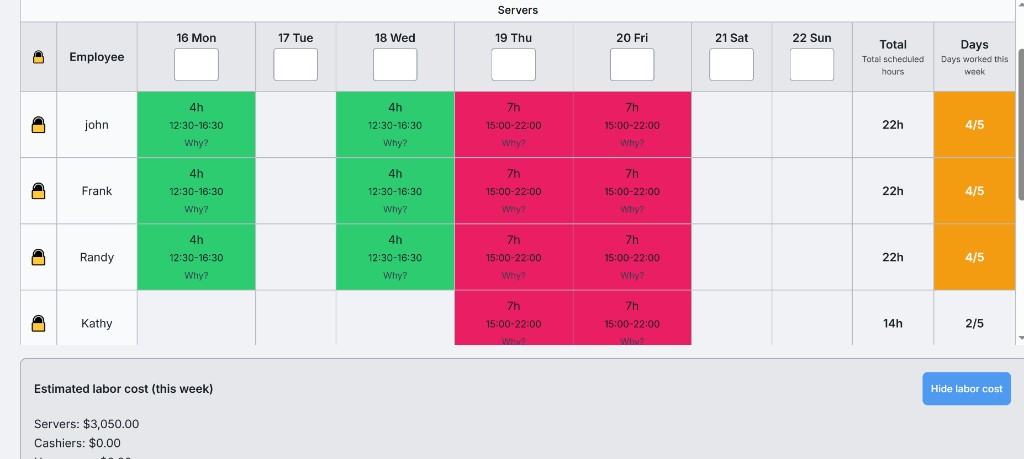
Stop wrestling with spreadsheets. BanquetLogic is employee scheduling software built for banquet and event staff: auto-generate seniority-based schedules in seconds, find replacements in one click, and email your team their shifts. Fully customizable to your rules and preferences.
Sound familiar?
Spending hours every week building schedules by hand
Copy-pasting names, checking seniority, and hoping nothing breaks.
Constantly fielding complaints about unfair shift assignments
Everyone thinks they got the short end of the stick.
Scrambling to find replacements when someone calls out
Last-minute callouts with no clear way to see who's free.
BanquetLogic was built by someone in the industry who lived these problems every day. Cut scheduling time to minutes instead of hours.
Spreadsheets vs BanquetLogic
| Spreadsheets | BanquetLogic | |
|---|---|---|
| Build a schedule | Hours of manual work | One click |
| Fair by seniority | You figure it out | Built-in, configurable |
| Find a replacement | Phone and guesswork | One-click replacement finder |
| Send to team | Copy, paste, email | Email schedule button |
| Staffing for event size | Manual calculation | Staffing calculator |
| Customization | Manual formulas, no structure | Assignment style, labor pools, preferences, max days |
Everything your banquet department needs
Employee scheduling software that handles seniority, labor pools, and event staffing in one place.
Seniority-Based Scheduling
Our smart engine assigns shifts based on seniority ranking, employee type, and preferences. Fair, transparent, and automatic.
One-Click Replacement Finder
When someone calls out, instantly find the best available replacement based on seniority, availability, and hours worked.
Multiple Scheduling Modes
Choose Strict Seniority, Balanced Coverage, or Fair Distribution. Customize rules, employee types, and preferences so the system matches how your department actually operates.
Smart Staffing Calculator
Enter your guest count and service type. BanquetLogic automatically calculates exactly how many servers you need.
Email Schedules Instantly
Use the Email schedule button to send each employee their schedule in one click. Everyone gets a personalized schedule with shift times and event details.
Works On Any Device
No app to download. BanquetLogic works in any browser on phones, tablets, and computers. Your team can check their schedule anywhere.
Your Language
Use BanquetLogic in English, French, or Spanish. Switch language in Settings anytime.
Customization Options
Set your assignment style (Strict Seniority, Balanced, or Fair Distribution), define labor pools (e.g. Servers, Cashiers, Housemen), set per-employee AM/PM and day preferences, max days per week, and how to handle duplicate names. The scheduler follows your rules.
Up and running in minutes
Add Your Team
Import your seniority list or add employees one by one. Set their type, preferences, and availability.
Create Events
Add your banquet events with dates, times, and guest counts. We'll calculate staffing needs automatically.
Generate Schedules
Hit generate and watch BanquetLogic create a complete, fair schedule. Edit manually if needed.
Send to Your Team
Use the Email schedule button to send each employee their schedule in one click.
Simple, transparent pricing
One plan. Everything included. No hidden fees.
Trusted by banquet and event teams at hotels, convention centers, and caterers.
Monthly
$39/month
Billed monthly
- All features included
- Unlimited employees
- Unlimited events
- Email schedule delivery
- Full audit log
- Priority support (email, typically within 24 hours)
14-day free trial • Cancel anytime
Annual
$349/year
$29.08/month — Save $119
- All features included
- Unlimited employees
- Unlimited events
- Email schedule delivery
- Full audit log
- Priority support (email, typically within 24 hours)
14-day free trial • Cancel anytime
Frequently asked questions
For step-by-step help, see the BanquetLogic user guide.
How does the 14-day trial work?
Start your free trial when you sign up. You get full access to all features. After 14 days, you’ll be charged monthly or annually depending on the plan you chose. You can cancel anytime before the trial ends and you won’t be charged.
Can I cancel anytime?
Yes. Cancel from your account billing page. You keep access until the end of your current billing period.
What happens to my data?
Your employees, events, and schedules are stored securely. If you cancel, you can export or use your data until the end of your access period.
We have multiple venues. Can we use one account?
One subscription covers one account. You can create multiple events and schedule all your staff from that account. If you need separate teams or venues with separate data, that would mean separate accounts.
Ready to simplify your scheduling?
Join banquet teams who stopped fighting with spreadsheets.
Questions? Contact us at support@banquetlogic.com